
Opening Statistics
Open the gallery and tap the card at the bottom (time · paintings · streak). Statistics rises from the bottom of the screen; tap ⌄ to close it. On iPad with a keyboard, press ⌘⇧S.
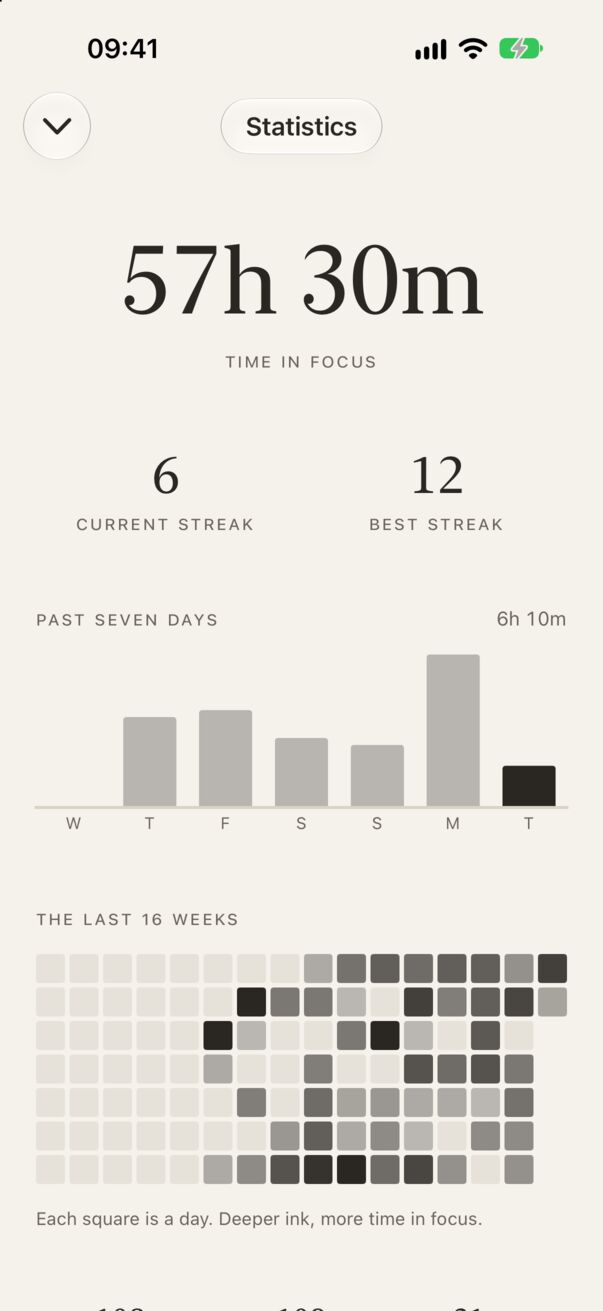
What you’ll see
- Time in focus: the total of all completed sessions.
- Current streak and best streak: consecutive days with at least one completed session.
- Past seven days: a bar per day, today on the right.
- The last 16 weeks (26 on iPad): each square is a day; deeper ink means more time in focus.
- Paintings: how many different works you’ve uncovered, and how many sessions you’ve completed.
How streaks are counted
A day counts when you complete at least one session. Your current streak stays alive through today, so a streak from yesterday isn’t broken until the day is over. Sessions ended early don’t count.
Milestones
At 10, 25, 50, 100, 250, 500 and 1,000 paintings, Easel pauses for a moment: your three latest paintings, fanned in gilt frames, and the number. You can share it, or continue.
And every December there’s Year in Review.